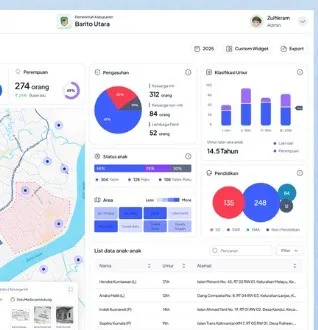
WebGIS and Thematic Maps for Local Governments: Lessons from POMPy BATARA in Barito Utara
Regional data is scattered across many agencies and formats. A thematic map brings it into one view that leaders and residents can read. Here are the steps, with a real example from Barito Utara.

WebGIS is a geographic information system accessed through a browser. A thematic map shows one theme of data over a territory, such as the spread of schools, health facilities, or development projects. For local governments both are useful because almost every development decision is about a place.
The problem: the data exists, but it is scattered
Each agency usually keeps its data in spreadsheets, sector-specific apps, or PDF reports. When leaders need a picture of the region, staff collect and combine it by hand. The result is slow and often differs between sources.
Example: POMPy BATARA in Barito Utara
POMPy BATARA is the thematic map (One Map) portal and regional dashboard of Barito Utara Regency. It integrates spatial and thematic data from several regional agencies into one view, so development information is easier to open and read in the context of the territory. Sentra Technology took part in its development together with the Barito Utara Regency communications and informatics office (Diskominfosandi), and the regency won the Digital Innovation Award 2026 through the portal, as reported by ANTARA. The portal is at pompy.baritoutarakab.go.id.
Common data layers
- Administrative boundaries of districts and villages as the base for every other layer.
- Education and health facilities with their locations.
- Infrastructure such as roads, bridges, and networks.
- Development projects and their status.
- Land use and spatial plans.
- Social data already aggregated per area.
Steps to build it
- Start from data that already exists in regional agencies instead of waiting for new data.
- Name an owner for every layer: who updates it, how often, and from what source.
- Align standards: coordinate system, region codes, and a short metadata note per layer.
- Combine gradually: show 3 to 5 priority layers first, then add more.
- Design two views: a concise dashboard for leaders and a public map that residents can read easily.
- Control access: sensitive or unfinished data does not become public automatically.
- Plan upkeep: data update schedule, backups, and a team that is responsible.
Common mistakes
- A good-looking map with data that is never updated, so it is quickly abandoned.
- Too many layers from the start, which confuses users.
- No data owner, so every agency waits for the others.
- Built only for the technical team, not for leaders and the public.
Relation to SPBE and One Data
A thematic map shows data that is already in order. That is why it usually appears as a result of efforts to unify data under SPBE and regional One Data, not as a replacement for them.
See the POMPy BATARA project page, Sentra's Data & Analytics service, and government solutions.
Tell us about the process. We'll help map out the most proportionate approach.