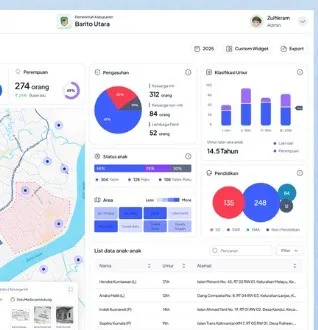
Regional One Data: Steps to Build a Dashboard for Leaders
A leadership dashboard is only as good as its data. Here is the order of work that usually succeeds, from collecting data to displaying it.

Regional One Data is the effort to make a local government's data accurate, current, integrated, and easy to share between regional agencies. Its basis is Indonesia's One Data policy (Presidential Regulation No. 39 of 2019), which asks data to have standards, metadata, and interoperability, and divides roles between data producers and data managers.
The leadership dashboard is the visible face of that effort. But a dashboard built before the data is in order is usually abandoned quickly, because its numbers differ from agency reports.
Start from the leader's questions
Ask what the leader wants to know every morning or in every meeting. From there, choose 10 to 20 priority indicators, such as budget realization, program achievement, number of residents in poverty, infrastructure condition, and public service figures. Do not start from all the data that exists.
Steps to build it
- Inventory the data. Record what data each regional agency holds, its format, and how often it is updated.
- Set the priority indicators from the leader's questions.
- Assign roles. Who produces the data in each agency, and who manages the data portal overall.
- Align definitions and standards: units, periods, region codes, and the formula for each indicator, written in short metadata.
- Collect the data in one place through scheduled uploads or direct integration from agency applications.
- Validate. Compare the numbers with official reports and record who approved them.
- Build the dashboard with a concise view: headline numbers, trends, and comparison across areas, with detail on click.
- Schedule updates and decide who is responsible when data is late.
Adding the place dimension
Many indicators are easier to read on a map. Once the data is tidy, a map layer can be added on top. An example is in the article on WebGIS and thematic maps for local governments.
Personal data protection
Not all data may be opened. Data containing personal identity is subject to the Personal Data Protection Law (Law No. 27 of 2022). Show aggregated data on the dashboard, restrict access to detailed data, and record who opens it.
Common mistakes
- Building the dashboard first and tidying the data later.
- Too many indicators, so leaders never open it.
- No one responsible for updates, so the numbers go stale.
- Each agency uses a different definition for the same term.
How long and who is involved
A first version with 10 to 20 indicators can be ready much sooner than a whole data portal. Involve the agencies that handle planning data, statistics, and information technology, because they usually hold the data and the standards.
See Sentra's Data & Analytics service and government solutions, and the broader preparation in the SPBE article for local governments.
Tell us about the process. We'll help map out the most proportionate approach.